


UPCOMING EVENTS
- Details
- Details
So what are Site Shapers? They are quick installs of Joomla combined with all the modules, content, etc used on our demo, excluding stock photography. Within a few minutes you can have your site up, running and looking just like our demo. No more importing SQL dumps and installing modules. Just head on over to the download section of this template and grab a Site Shaper. Simply install the Site Shaper like any other Joomla installation, it's that easy!
How to setup a Site Shaper
- Login to your cpanel or your server admin panel.
- Locate the area where your databases are (usually labeled Mysql Databases)
- Create a new database
- Next create a new database user and assign it to this newly created database in the previous step
- You will then need to extract the site shaper to either a folder on your server or the root directory such as WWW. NOTE: if you already have a website in the root of your WWW folder, we suggest creating a new folder and extract the site shaper there. If your cpanel does not have an extract option or you cannot find it, you may also extract the contents of your site shaper in to a folder on your desktop and upload all the files via an ftp client to your server.
- Next, navigate to the url where you extracted the site shaper via your web browser.
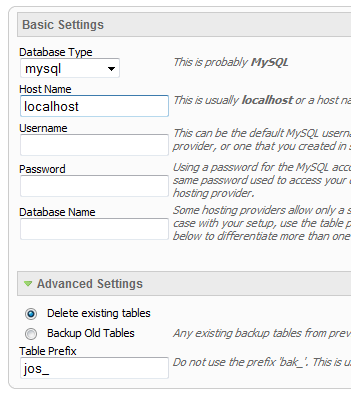
- Continue through each screen until you reach the below screenshot:
- At the above screen be sure to enter localhost as shown, continue to fill in the following text fields with your newly created database and username information
- Follow through the rest of the site shaper setup and click the install sample data at the last screen and the installation is complete! (be sure to rename/remove the installation directory after finishing the install)
- Details
SEO - Get your site noticed!
Not only is this template beautifully designed but it is great for search engine optimization as well! What is SEO? It is simple the act of altering a web site so that it does well in the organic, crawler-based listings of search engines such as google.com. How does this template accomplish this? It's simple, the majority of your most valuable content is found in the main body of your site, through css we are able to alter the layout of the site and call the main content before the left and right columns are called. This allows for your content to be found first by search engines before it reaches your other content, which is vital in search engine optimization. This is a common feature this can be done with almost all of Shape 5 templates as well.
- Details
The module holds up to 10 actual module positions so you can publish any of your favorite modules to one of the slides and keep your site clean and consolidated while giving it a nice effect. Simply publish the s5 tab show module to your desired module position and pages. Then start publishing modules to the positions in the tab show (s5_tab1, s5_tab2, etc); these modules will become the slides. There is also an automatic advance feature that allows you to automatically advance through the slides are your own specified interval.
- Details
Features:
- Choose from several effects
- Up to 10 images
- Up to 10 module positions if using module mode
- Choose auto rotate or manual rotate
- Show/Hide: thumbnails, navigation arrows and pause/play buttons
- Set links to each image and define if they show in a new window or in the same
- Set the width and height of the module
Module tutorial:
After installing the module be sure to add in below positions to your template details.xml file located in the root of your template folder. If you are running a template older than Maxed Mag or a non Shape 5 template.
imageslide_1
imageslide_2
imageslide_3
imageslide_4
imageslide_5
imageslide_6
imageslide_7
imageslide_8
imageslide_9
imageslide_10
Once you are sure you have the module positions in then just simply start publishing modules to the positions. Be sure to do them in order, not imageslide_1 and then imageslide_4. Be sure its in sequential order.
Image Tutorial:
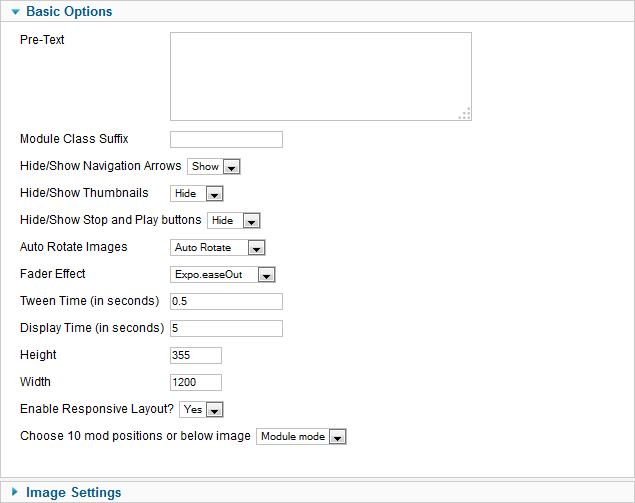
After installing the module simply publish it to your site and add URLs to images located on your server. As you can see from the below screenshot you need to enter the URLs to the images, once this is done the fader will start cycling through the images, be sure to add them in order from 1 - 10.
Screenshot of S5 Image Slide Admin:
- Details
This module can be viewed at the top of this page. This specific style of the module can only be used with this template. Publish your own content into each slide transition and for multiple slide transition effects, navigation arrows and also a drop down gallery tab that allows you to select a slide via a thumbnail. This module is fully responsive as well. The S5 Image and Content Fader v3 is powered by Mootools by default but still includes the S5 Effects library and allows you to use it in a "legacy module" if you are experiencing script conflicts. Best of all it's free!
NOTE: Legacy mode will display all your images, titles and slide text but includes limited functionality thus it does not include navigation arrows or the new drop down gallery tab.
Features at a glance:
- Responsive layout compatible
- horizontal sliding transition
- Choose between 4 slide transitions: Fade, Contiuous Horiztonal, Fade Slide Left, Continuous Vertical
- Specify height and width of module
- Includes a gallery tab drop down to show all images
- Each image slide can have its own hyperlink
- Show up to 10 images at once
- Publish your own content to each picture slide
- Navigation arrows
- Not all slides require titles
- Change delay time
- Hide or show: Navigation arrows, thumbnail carousel and popup text